
New account
Create a 345e account
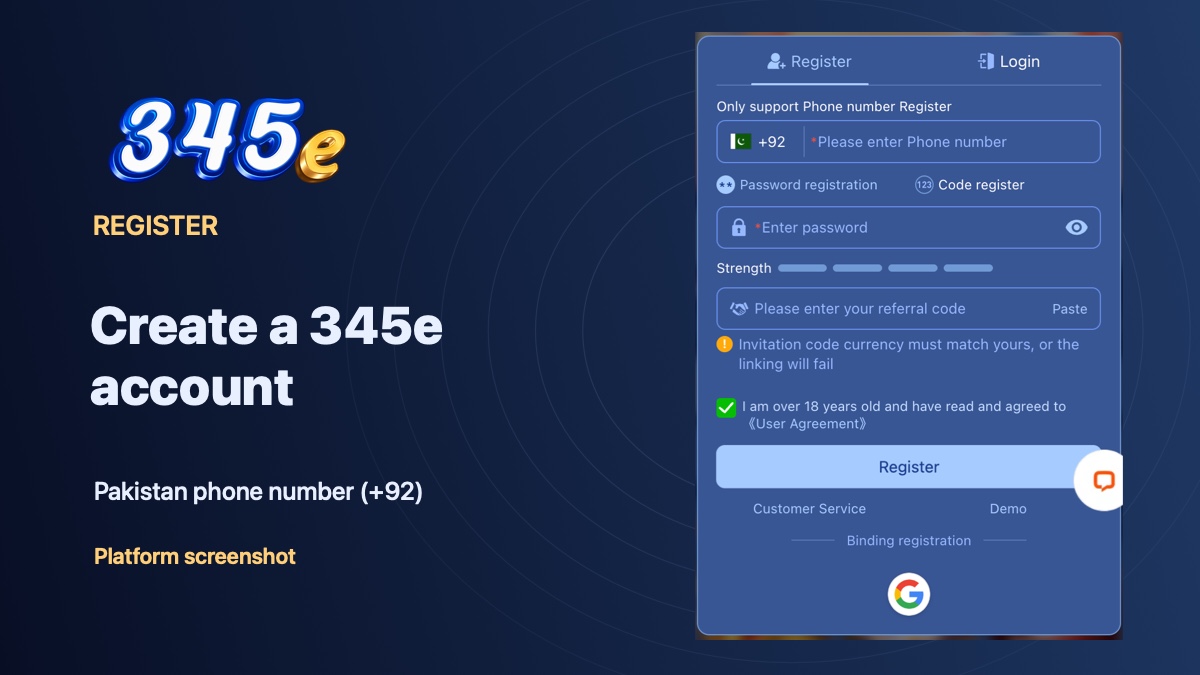
Open Register and enter your +92 phone number. Choose Password registration or Code register, then read the 18+ confirmation and User Agreement before submitting.
Have your contact details ready
- Have your Pakistan mobile number ready and check the +92 prefix.
- Keep any verification code private. If using an invitation code, check that its currency matches your account.
- Review the User Agreement and confirm you are over 18 before submitting.
Registration
Open the registration form
Follow the labels displayed by 345e.
Choose Register
Open the account panel and select Register.
Enter your +92 phone number
Choose Password registration or Code register and follow the fields on screen.
Review the invitation code if using one
The form says its currency must match the account currency.
Review the agreement
Read the User Agreement and the 18+ confirmation before tapping Register.
Review the first-deposit offer after registration
The 30% banner applies to eligible first deposits. Open Promo to check the current requirements before funding your account.
 Welcome offer
30% first-deposit offer
The cashier shows PKR 30 at the PKR 100 first-deposit tier. Open the campaign to see bonus amounts for other tiers and the conditions that apply.
Check the active first-deposit tier, method and campaign rules.
View rules
- Open the first-deposit banner before funding the account.
- Check whether the amount you plan to deposit qualifies and how bonus funds can be used.
345e registration questions
Which registration methods does 345e show?
The Pakistan form shows phone registration with Password registration or Code register. A Google binding option is also shown.
What if a form field or code is missing?
Check the message on the form. Ask 345e Support for help if the issue continues.
Need help with a new account?
Keep the error message and the contact method used when asking for help.